The problem
Turning a story idea into a visual storyboard is slow, repetitive work. You break the idea into scenes, keep characters and locations consistent across dozens of frames, and hand-write an image-generation prompt for every panel.
Text-to-image also gives you almost no control over staging. You can describe “low angle, character on the left” and get something else entirely, every time.
I wanted a tool where you describe the idea once and get an editable storyboard, and where the camera is an actual camera instead of an adjective in a prompt.
What it does
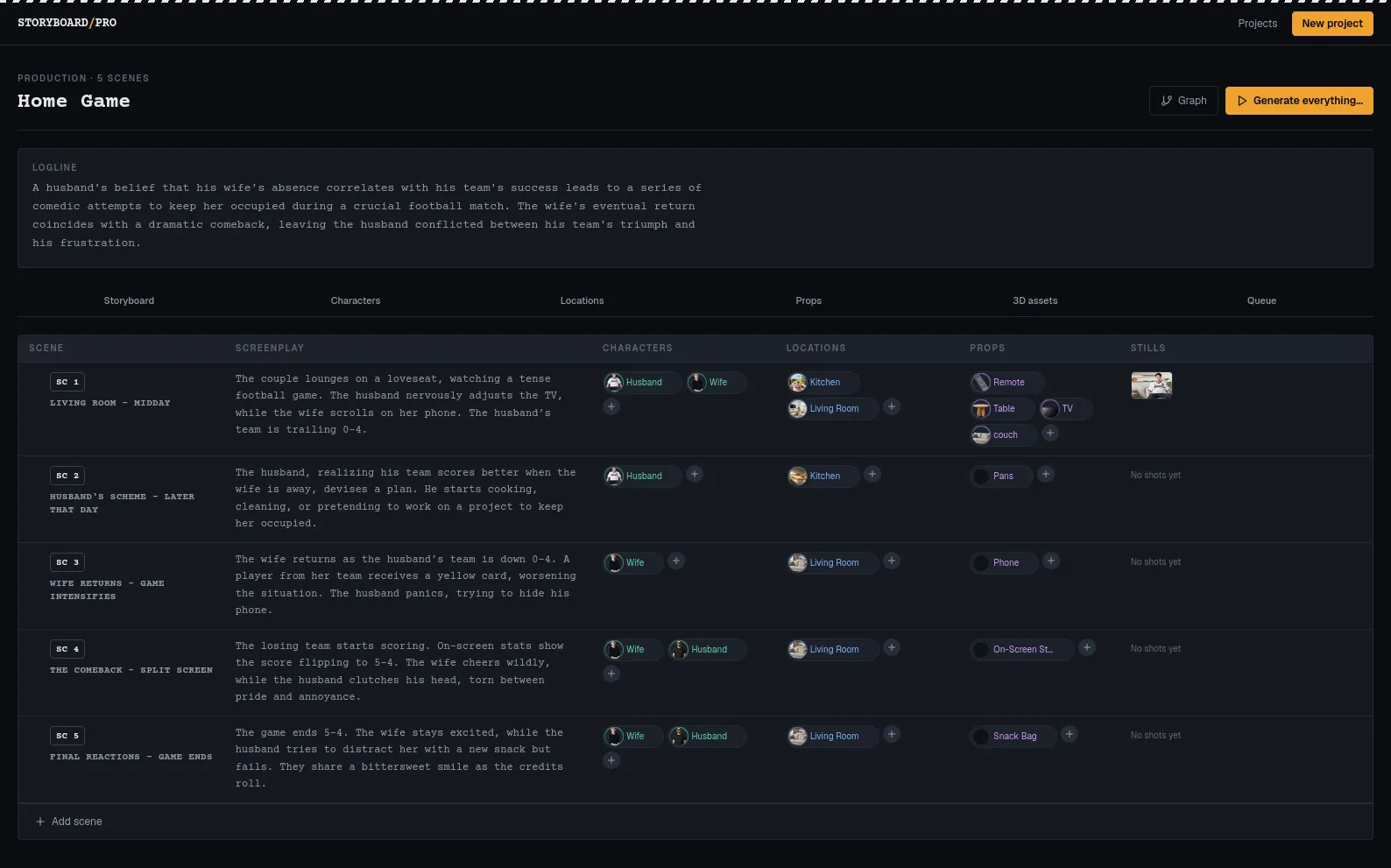
A local LLM (Qwen3-14B on llama.cpp, speaking OpenAI-compatible HTTP) expands a one-line idea into structured scenes, characters, locations and props, stored in PostgreSQL. Every entity gets a generated, editable prompt profile, and every project gets a style profile. Those profiles are what keep a character looking like the same character from shot to shot, because the model re-reads a stored description instead of inventing a new one each time.
Each scene also carries a master shot list covering size, angle, movement, equipment and audio notes, drafted by the LLM and editable inline. A headless ComfyUI instance renders through 12 or more workflows: Z-Image Turbo, Flux-2 Klein edit, Krea2, plate and outpaint passes, TripoSG and Trellis2 meshes, and image-to-video.
Blocking the shot in 3D
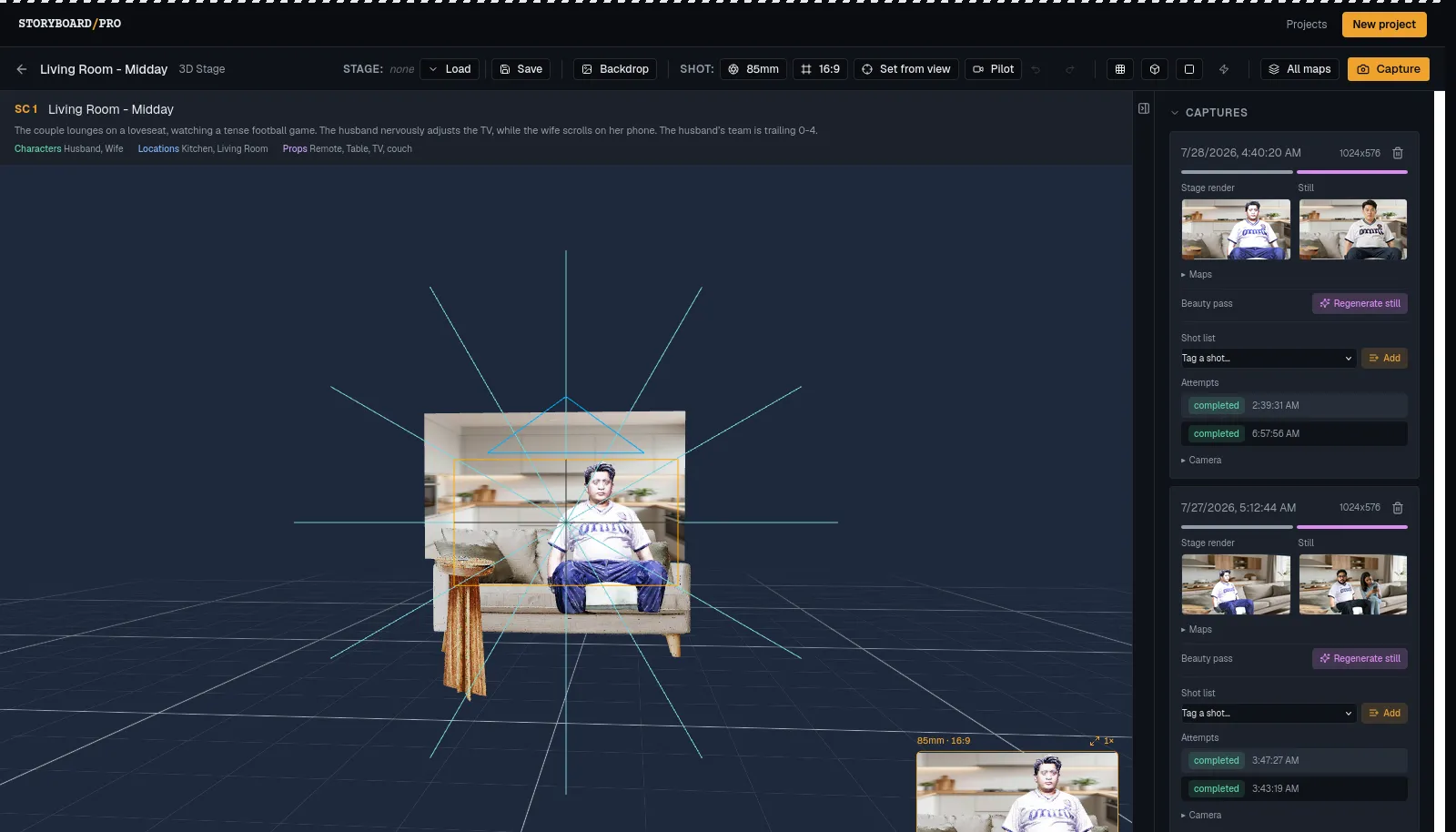
This is the part I would rebuild the project for. Instead of describing a camera angle, you place characters and props on a stage in the browser with React Three Fiber, then frame the shot through a real camera with a real lens and aspect ratio. The stage renders a color pass that conditions image generation, so the generated frame matches the blocking. Composition, pose and eyeline hold because they were specified geometrically rather than described in words.
The 3D proxies are deliberately rough. A Flux Klein beauty pass then restores the character’s real face from their reference photo while preserving the staged composition, which turns a distorted mesh into a photoreal frame in about two minutes.
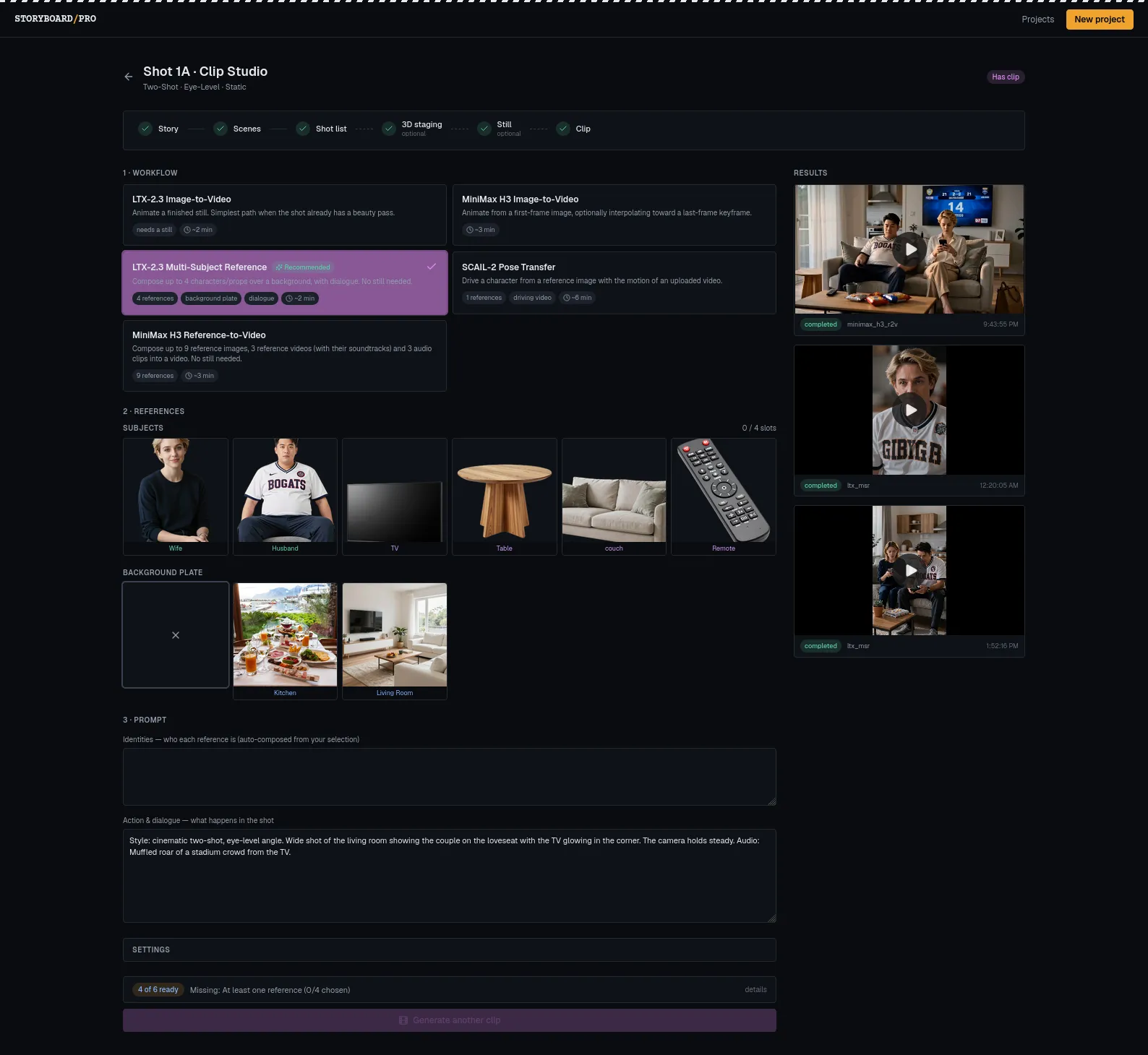
Finished stills feed image-to-video (LTX-2.3) and pose-transfer animation. The shot list’s metadata composes the motion prompt, so a wide static crowd shot and a handheld close-up produce materially different clips from the same still.
Architecture
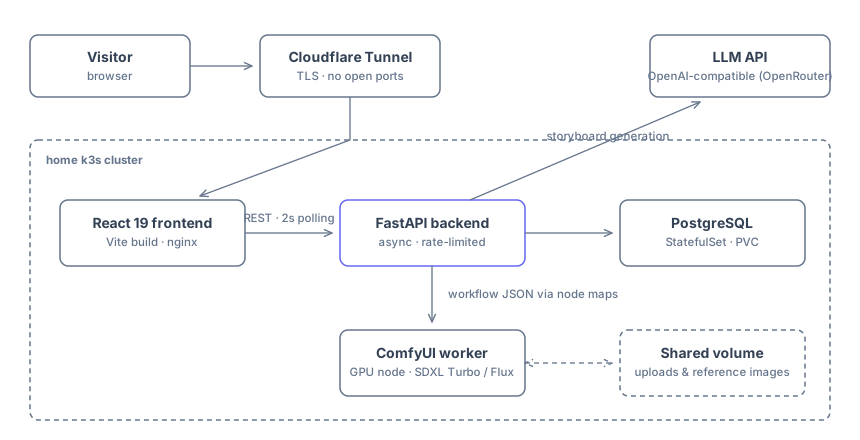
| Layer | Tech | GPU |
|---|---|---|
| Frontend | React + Vite + Tailwind v4 + R3F | None |
| API | FastAPI (async) + background job worker | None |
| Engine | ComfyUI (headless) | device 1 |
| LLM | llama.cpp (Qwen3-14B GGUF) | device 0 |
| Database | PostgreSQL 15 (async SQLAlchemy) | None |
| Side-cars | Mesh optimizer, background remover | None |
The constraint that shaped everything: ComfyUI is an engine, not an API you design. It accepts an entire workflow graph as JSON, and node IDs change whenever the graph is re-exported. I handled that with node maps, a small JSON file per workflow naming the injection points for prompt, seed, input image, reference image and filename prefix. Application code injects values through the map, so adding a model takes two files and no Python.
Other pieces I am happy with:
- Jobs live in the database. A background worker loop claims
JobRecordrows, submits them to ComfyUI, polls to a terminal state, retries with backoff, and reaps orphanedrunningjobs on restart. Generation advances with no browser in the loop, and progress survives a page reload. - One
Referencemodel attaches any generated asset to any entity type through a type-tagged relationship, so a single table and one set of routes serve four parent types. - Two CPU-only side-cars keep work off the GPU queue. Background removal vendors ComfyUI’s own BiRefNet model code and runs it on plain CPU PyTorch; mesh optimization bakes and decimates in headless Blender.
- The pytest suite swaps PostgreSQL for in-memory SQLite and mocks ComfyUI’s HTTP API, so the backend tests run in seconds on any machine, GPU or not.
What broke along the way
- ComfyUI node IDs are unstable. My first version hard-coded them and broke the moment I edited a workflow in the editor. That failure is what produced the node-map layer.
- A “completed” job with zero output files was being marked successful. ComfyUI reported completion, my poller believed it, and failures surfaced as empty successes further down the pipeline. It now requires an actual file on disk or fails loudly. The general lesson, that an upstream status field is not proof of the artifact you actually need, has paid for itself repeatedly.
- The same bug three times: output-directory files fed to an input-only loader. Each new
generation stage chained off a prior stage’s output, and ComfyUI’s
LoadImageonly ever reads its input directory. Three separate stages, one root cause. I check for it on every new stage now. - Adding one relationship field to a shared response schema returned 500s from unrelated
endpoints. A
videosfield on a shared Pydantic model made every endpoint that serialized that model lazy-load it during sync serialization, which raisedMissingGreenlet. The 133-test suite stayed green throughout, because no unit test exercised that path; it only failed in a browser. That taught me that an async ORM’s failure modes ignore test boundaries, and that a passing suite is not the same as a working app. - A global “primary image” flag fought an existing per-scene one. I built index-backed enforcement for the wrong model, then deleted almost all of it. The fix was one callback wired to the mechanism that was already correct. Now I check whether a correctly scoped mechanism already exists before building enforcement on a global one.
What I’d do differently
- Replace the polling loop with WebSockets or server-sent events for generation status.
- Add priorities to the job queue instead of relying on ComfyUI’s internal queue, so one long video job cannot starve a batch of quick stills.
- Design for structured LLM output validation from the start. Retrofitting schema checks onto free-form responses was harder than building for them would have been.
- Add authentication. The stack currently assumes a trusted local network, which is exactly why it is not exposed publicly.